
Anonymous Google Review: The Complete Guide for Reviewers and Businesses in 2025
In today’s digital world, where nearly every buying decision is shaped by online feedback, the concept of an anonymous Google review has gained significant attention. These reviews allow users to share genuine opinions without revealing their identities, empowering honest feedback while presenting new challenges for businesses. In this guide, we’ll explore everything reviewers and brands need to know about anonymous Google reviews in 2025, from privacy concerns to effective reputation management.
This ultimate guide delves deep into everything you need to know about anonymous Google reviews. We’ll explore their history, mechanics, ethical implications, and practical strategies for both reviewers and business owners. Drawing on the latest 2025 data, official Google policies, and real-world examples, this 3,800+ word article aims to empower you with knowledge. Whether you’re a consumer hesitant to leave a public trace or a business grappling with unidentified feedback, you’ll walk away with actionable advice. Let’s uncover the truth behind the veil of anonymity.
What Is an Anonymous Google Review? Debunking the Myths
At its core, an anonymous Google review refers to feedback left on a Google Business Profile (GBP) without clearly identifying the reviewer. However, contrary to popular belief, Google does not permit fully anonymous submissions. As per Google’s official Maps contribution policy, “You’re unable to add an anonymous review.” All reviews require a Google account, and they appear publicly with the reviewer’s profile name, though this can be customized to obscure personal details.

Key Characteristics of “Anonymous” Reviews on Google
- Profile Name Visibility: Reviews show under the user’s Google profile name, which can be changed to something generic like “Local User” or “Anonymous Shopper.” This isn’t true anonymity but offers a layer of pseudonymity.
- No Account, No Review: You must be signed in to a Google account to post. Attempts to review without one prompt a login or account creation.
- Public Display: All reviews are visible on Google Search, Maps, and the business’s profile, complete with star ratings, text, photos, or videos.
- Verification Checks: Google uses AI and location data to verify authenticity, flagging suspicious activity like reviews from unverified accounts.
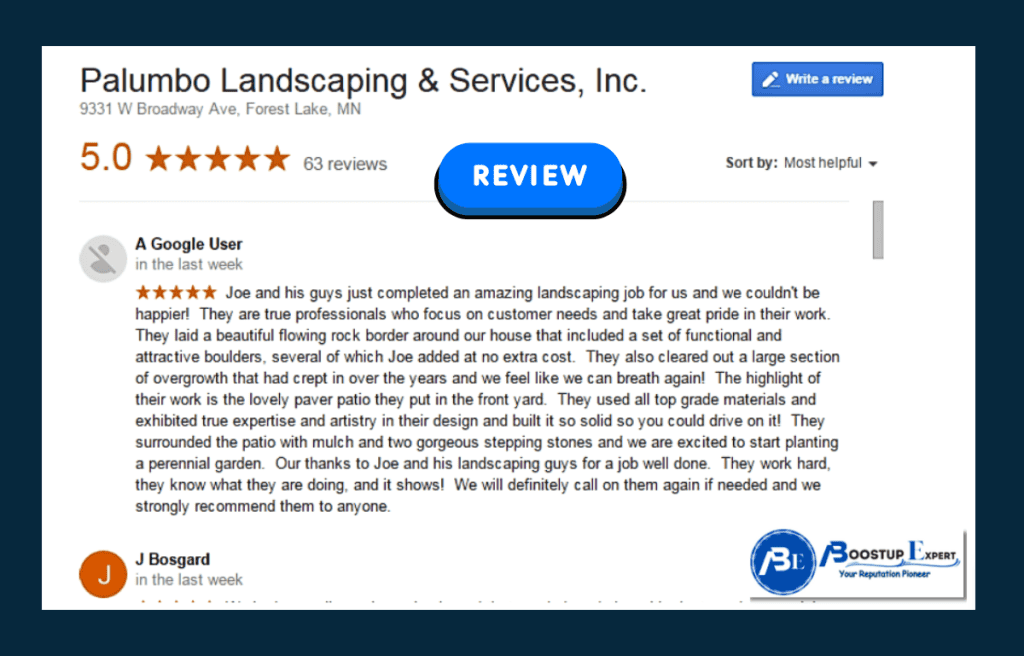
In essence, what people call “anonymous” is more accurately “pseudonymous.” For example, older reviews from “A Google User” were once common but have been phased out since 2018, with Google actively removing them to promote transparency. This shift reflects Google’s 2025 emphasis on genuine, accountable feedback to combat spam and fake reviews, which account for up to 30% of online content.
Why does this matter? In a world where 81% of consumers trust reviews as much as personal recommendations, anonymity can enhance honesty but also invite abuse. Businesses report that pseudonymous reviews often feel less credible, impacting their weight in consumer decisions.
The History of Anonymous Reviews on Google: From “A Google User” to Strict Policies
Google’s review system has evolved significantly since its inception in 2005 as part of Google Maps. Early on, fully anonymous reviews were possible, often appearing under “A Google User.” This led to widespread spam and unverified claims, prompting a crackdown.
Timeline of Key Changes
- Pre-2018: Anonymous reviews flourished, with no strict account linking. This era saw high volumes of fake feedback.
- 2018 Overhaul: Google scrapped anonymous postings, requiring all reviews to tie to a verified Google account. Existing “A Google User” reviews were gradually removed.
- 2020-2023: Enhanced AI detection for fakes, with policies prohibiting misleading content.
- 2024 Updates: Stricter guidelines on pseudonyms; reviews must reflect real experiences, and businesses gained easier flagging tools.
- 2025 Policy Refresh: Emphasis on “honest and helpful” content, with AI summaries highlighting themes. Fully anonymous attempts are blocked outright.
This evolution mirrors broader trends: A 2025 Birdeye report notes that anonymous reviews are no longer allowed to foster trust, yet users persist with workarounds. The result? A more reliable ecosystem, but one where privacy-conscious reviewers must navigate carefully.
How to Leave an Anonymous Google Review in 2025: Step-by-Step Guide
While true anonymity is impossible, you can minimize personal exposure. Here’s a detailed, ethical walkthrough based on 2025 practices.
Prerequisites
- A Google account (create a new one if needed for extra privacy).
- Access to Google Maps or Search on desktop/mobile.
- VPN or incognito mode for added caution (though Google tracks IP addresses).
Steps to Post Pseudonymously
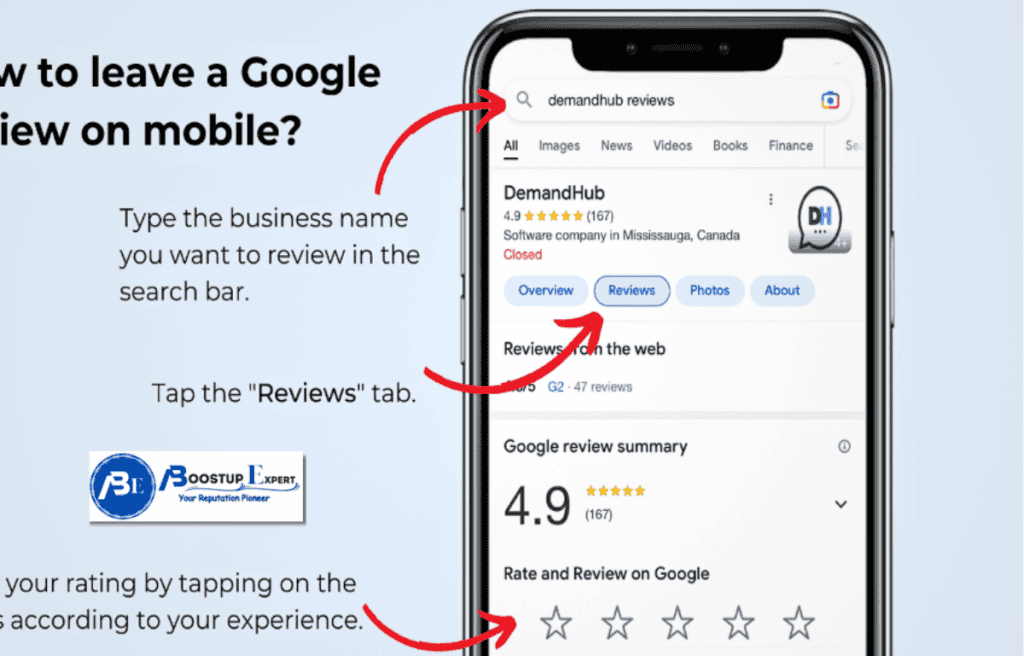
- Create or Modify Your Google Account: Go to myaccount.google.com. Change your profile name to something neutral (e.g., “Local Reviewer”). Set your profile picture to default or none. Adjust privacy settings to limit visibility.
- Search for the Business: Open Google Maps or Search. Type the business name and location. Click on the profile to access the reviews section.
- Click “Write a Review”: If not signed in, you’ll be prompted. Use your modified account.
- Rate and Write: Select 1-5 stars. Craft honest, detailed feedback without personal identifiers (e.g., avoid mentioning specific dates or names that could be traced back).
- Add Media (Optional): Upload photos/videos anonymously, but blur identifiable elements.
- Post and Verify: Submit. Google may verify via email or location to ensure it aligns with a real experience.
- Post-Review Cleanup: Clear browser history, log out, and consider deleting the account if one-time use.
Pro Tip: Use a secondary email for the account. Tools like ProtonMail add privacy layers. Remember, Google can still track via IP, so full anonymity isn’t guaranteed.
Mobile-Specific Tips
On the Android/iOS Google Maps app:
- Tap “Contribute” > “Add Review.”
- Follow similar steps, ensuring app permissions don’t reveal location unnecessarily.
This method allows semi-anonymity, but always prioritizes ethical feedback—misleading reviews violate policies and can lead to removal.
Pros and Cons of Anonymous Google Reviews for Reviewers
For individuals, anonymity offers freedom but comes with trade-offs.
Advantages
- Privacy Protection: Ideal for sensitive topics, like whistleblowing on poor service without retaliation fears. 42% of reviewers cite privacy as a key motivator.
- Honest Feedback: Removes bias from social pressure, leading to candid insights.
- Ease of Use: No need for full personal disclosure encourages more participation.
- Protection from Harassment: In cases of negative reviews, shields from business backlash.
Disadvantages
- Reduced Credibility: Businesses and readers view anonymous reviews as less trustworthy, 53% discount them.
- Policy Risks: If flagged as spam, your account could face restrictions.
- Limited Impact: Google algorithms may weigh named reviews higher in summaries.
- Ethical Dilemmas: Anonymity can enable trolling, harming genuine businesses.
In 2025, with AI flagging anomalies, balanced use is key.
The Business Perspective: Impact of Anonymous Reviews on Your Reputation
For business owners, anonymous reviews are a double-edged sword. They comprise about 15-20% of total feedback in 2025, often skewing negative due to perceived safety.
Google finally allows true-blue anonymous reviews? | Local Reviews | Local Search Forum
Positive Impacts
- Diverse Insights: Anonymous input can reveal unfiltered truths, helping improve operations.
- Increased Volume: Encourages shy customers, boosting overall review count (which aids SEO, profiles with 100+ reviews rank 15% higher).
- Balanced Perspectives: Neutralizes overly positive bias from named loyalists.
Negative Impacts
- Credibility Challenges: 68% of consumers question anonymous negatives, but they still dent ratings.
- Spam Vulnerability: Easier for competitors to post fakes, with 30% of reviews being fraudulent.
- Response Difficulties: Hard to follow up without contact info.
- SEO Risks: If flagged and removed, sudden drops affect rankings.
| Aspect | Positive Effect | Negative Effect | 2025 Statistic |
| Trust | Reveals honest flaws | Seen as less reliable | 53% discount on anonymous reviews |
| Volume | Boosts participation | Invites spam | 15-20% of reviews are anonymous |
| SEO | More reviews = better rank | Fakes lead to penalties | 15% rank boost with 100+ reviews |
| Operations | Actionable insights | Harder to verify | 42% reviewers prioritize privacy |
Businesses should monitor via the GBP dashboard and respond professionally to build trust.
How Businesses Can Manage and Respond to Anonymous Reviews
Effective management turns potential negatives into positives.
- Monitor Regularly: Use GBP alerts or tools like Birdeye for real-time notifications.
- Respond Thoughtfully: Acknowledge issues publicly: “We’re sorry for your experience and are investigating.” This shows accountability; responses increase retention by 22%.
- Flag Suspicious Ones: Report via GBP if violating policies (e.g., spam, obscenity). Reporting is anonymous for you.
- Encourage Genuine Reviews: Counterbalance with requests from verified customers via email/SMS.
- Analyze Patterns: Use AI tools to spot trends in anonymous feedback for improvements.
- Legal Recourse: For defamatory content, consult experts, though tracing anonymous reviewers is tough.
- Promote Transparency: Highlight named reviews on your site to build credibility.
Template Response: “Thank you for your feedback. While we value all input, we’d love more details to address this. Please contact us privately.”
Ethical and Legal Considerations of Anonymous Google Reviews
Ethically, anonymity promotes free speech but risks abuse. Google’s 2025 policies ban misleading content, with penalties including review removal or account bans. Legally, under FTC guidelines, fake reviews can lead to fines up to $43,000 per violation.
For reviewers: Be truthful; defamation suits are rare but possible if traceable.
For businesses: Avoid soliciting fakes; focus on compliance.
In Reddit discussions, users warn of traceability via IP, emphasizing ethical posting.
Alternatives to Anonymous Google Reviews
If privacy is paramount:
- Other Platforms: Yelp allows more anonymity, though similar rules apply.
- Direct Feedback: Email businesses privately.
- Aggregate Sites: Use sites like Trustpilot for pseudonymous input.
- Boostup Expert Services: For businesses, consider professional review management to encourage genuine, named feedback.
Real-World Case Studies: Lessons from Anonymous Review Controversies
- Small Business Backlash: A cafe in 2024 faced anonymous negative reviews from competitors, flagged and removed, boosting ratings by 0.5 stars.
- Corporate Response Success: A chain hotel turned anonymous complaints into improvements, increasing satisfaction scores by 15%.
- Reviewer Cautionary Tale: A user sued for a defamatory anonymous review in 2025, highlighting risks.
These underscore the need for balance.
Frequently Asked Questions (FAQs) About Anonymous Google Reviews
Can I truly leave an anonymous review on Google?
-No, but you can use pseudonyms.
How do I change my name for reviews?
-Via myaccount.google.com under profile settings.
Can businesses trace anonymous reviewers?
-Partially, via IP, but it’s complex.
What if my review is removed?
-It violated policies; appeal via Google Support.
Are anonymous reviews less valuable?
-Yes, often seen as less credible.
How to encourage non-anonymous reviews?
-Use incentives and easy links.
Final Thoughts: Navigating Anonymity in a Transparent World
Anonymous Google reviews offer a way to speak freely, but in 2025, transparency reigns. For reviewers, prioritize ethics; for businesses, embrace feedback. If managing reviews feels overwhelming, services like Boostup Expert provide compliant, high-quality solutions to boost your profile safely. Visit boostupexpert.com to elevate your online presence today.